Google Local Services Ads and GoHighLevel: How to Get Every LSA Lead Into Your CRM
Connect Google Local Services Ads to GoHighLevel: route LSA calls, capture message leads, sync bookings and keep the source, with no native integration needed.
Muhammad Asif Khokhar·Founder & CEO, One Scale System·Published ·13 min read
Quick answer: GoHighLevel doesn't have a native sync for Google Local Services Ads calls and messages. You connect them in three lanes. Point your LSA business phone number at a dedicated HighLevel number so calls are recorded and tagged. Send message-lead notifications to an inbox that an automation turns into a contact, or pull leads from the Google Ads API. Use Reserve with Google so LSA bookings land in your HighLevel calendars. Then check the LSA lead inbox against your CRM once a week.
Every few weeks a roofer, plumber or HVAC owner asks us some version of the same question: "Our LSA calls show up in GoHighLevel, but when someone messages us from the ad, nothing happens." A recent thread on the GoHighLevel subreddit described exactly that. Calls landed in the intake pipeline. Texts went nowhere.
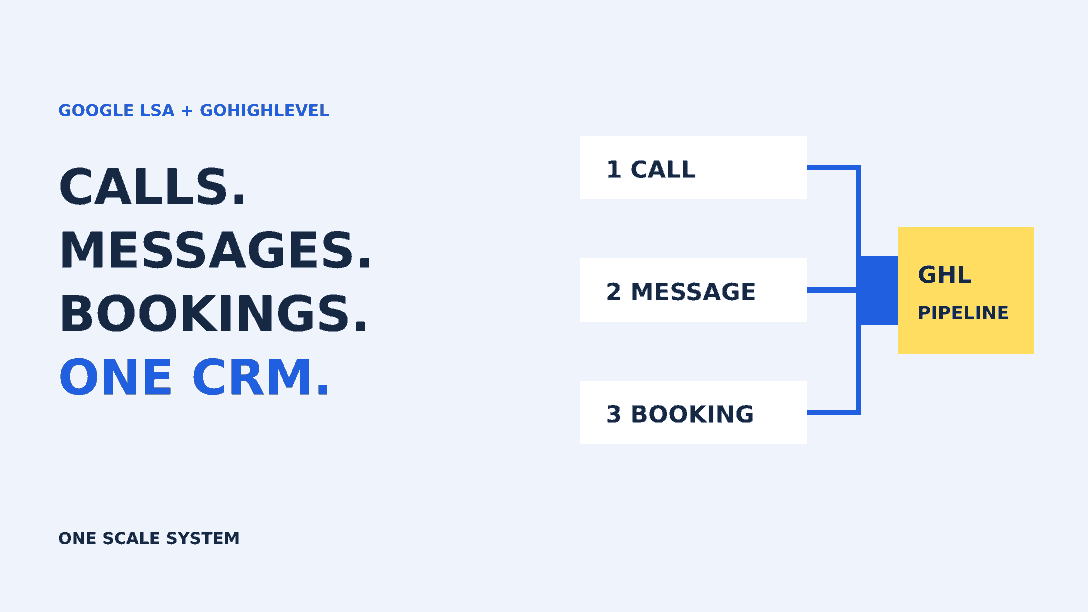
The cause is simple once you see it. Local Services Ads sends you three kinds of leads, and each one takes a different road. Calls come through a Google forwarding number. Messages are relayed through Google's anonymized aliases. Bookings come through Reserve with Google. Wire up one road and the other two leak.
This guide shows how we set up each lane for home service businesses, what we test, and where the limits are. It's written for owners and office managers who already run LSA and use HighLevel, or are about to.
Start with the quick check below. It takes about a minute and tells you which lanes to read first.
60-second check
Which LSA leads are you missing?
Tick only what's true today. Nothing is saved or sent anywhere.
Gaps to fix first: Calls, Messages, Bookings, Weekly check. The sections below cover each one.
How LSA leads reach you, and why GoHighLevel misses some
Google's Local Services help center explains that the number on your ad is a dynamic Google forwarding number. It forwards to the business number on your LSA profile, and you can't choose the number Google displays. Message leads work differently. Google routes the conversation through an anonymized alias and notifies you by email, by text message (US only), or both. You reply from the lead inbox or by answering the notification.
Lead type
How it reaches you
What HighLevel sees by default
What we set up
Phone call
Google forwarding number, then your business number
Only calls to a HighLevel number
A dedicated HighLevel number as the LSA destination, tagged and recorded
Message (text or email)
Google's anonymized alias plus an email or SMS notification
Nothing
Notification inbox to automation to contact, or an API pull
Booking (US and Canada)
Reserve with Google
An appointment, once booking feeds are approved
Google Organic Booking feeds from HighLevel calendars
That table explains most "LSA isn't syncing" complaints we're asked to fix. Calls work because someone set the phone number correctly. Messages don't, because nobody ever built a path for them.
Tap through the three lanes below to see the route and the test for each one.
Tap a lane
Where does each LSA lead go?
Choose a lead type to see how it reaches HighLevel and what to test. This is a planning diagram, not a live view of your account.
Arrives through: Google forwarding number, then the business number on your LSA profile.
Put a dedicated HighLevel number in the LSA business phone field.
Forward it to the phones your team actually answers.
Tag inbound calls on that number google-lsa and open an opportunity.
Keep ring time short and send unanswered calls to missed-call text back.
Test: Match last week's LSA call log against HighLevel call records.
Before you change anything: a 15-minute checklist
Open the LSA lead inbox and note the last 30 days of leads, split into calls, messages and bookings. You'll test against this baseline.
Write down the business phone number on your LSA profile and which phones it rings today.
Check which email address and phone number receive message-lead notifications. Google keeps these on the Profile & budget page.
If you plan to text these leads from HighLevel, confirm the sub-account's A2P 10DLC registration is approved.
Decide who owns an LSA lead during business hours and who owns it after hours. Use one name per window, not "the office".
That last step matters more than any workflow. Google says a consistently fast response time could improve your ad's ranking, and it may show an estimated message response time on the ad itself. Automation can alert someone in seconds, but a person still has to reply. Our contractor lead handoff checklist covers how to name that owner and the backup.
Lane 1: Route LSA phone calls through a GoHighLevel number
This is the quickest win, so it's where we usually start.
Set the LSA destination number
Pick a local HighLevel number used only for LSA. Don't reuse the number on your Google Business Profile or your website. If you do, you lose the ability to tell sources apart. Set the number to forward to the phones your team actually answers, then enter it as the business phone number on your LSA profile. Google still shows its own forwarding number on the ad, so customers never see the HighLevel number.
Google also notes that you may not hear its "Call from Google" announcement once call forwarding or VoIP sits on the line. That's expected. The dedicated HighLevel number now does the job of identifying the source.
Tag the source automatically
Build a workflow that starts on inbound calls to the LSA number, using whichever number filter your call trigger offers. Add a tag such as google-lsa, create or update an opportunity in your intake pipeline, and set the lead source. Use the same naming conventions you use for every other channel. Our guide to tracking lead sources in GoHighLevel explains why the first source and the latest source should stay separate.
Watch the 20-second rule
Here's the detail that quietly costs contractors money. According to Google's page on how Local Services leads are charged, a missed call during your business hours counts as a valid lead if the caller stays on the line for more than 20 seconds. A voicemail greeting during business hours is treated as a connected call. If a phone menu asks the caller to press a key, the 20-second timer starts after the first key press.
So if your HighLevel number rings for 30 seconds and then plays a greeting, you can pay for leads nobody spoke to. We keep ring times short, skip the phone menu on the LSA line, and send unanswered calls to missed-call text back straight away while the on-call person gets an alert. The text isn't a replacement for a callback. It just stops the homeowner from calling the next ad on the page while your tech climbs down a ladder.
Want to see what this means for your own account? Pull last month's numbers from your LSA lead inbox and billing page and plug them in.
Your numbers only
What do unanswered LSA calls cost you?
Use figures from your own LSA lead inbox and billing page. We don't fill in any averages.
Enter your missed calls and lead price to see the total.
Lane 2: Capture LSA message leads in GoHighLevel
This is the gap in most accounts we audit. A customer who messages from your ad never had your HighLevel number, so nothing arrives there. Google relays the conversation and sends you a notification instead. There are three realistic ways to turn that notification into a CRM record.
Option A: Route notification emails into an automation
Send message-lead email notifications to a dedicated address, something like lsa-leads@yourdomain. A tool such as Zapier or Make watches that inbox, pulls out the details it can find, and sends them to HighLevel through an Inbound Webhook trigger or a create-contact action. A HighLevel workflow then tags the contact, opens an opportunity and notifies the owner.
One warning from our own builds: read five or six real notification emails before you write a parser. Google's help page says the email contains a link to the lead details in your inbox, and the layout can change. If the customer's phone number isn't in the email, the contact will start with only a name, ZIP code or job type, and someone will still need to open the lead inbox to reply. That's fine. The alert, the record and the owner now exist, which is the part that was missing.
Option B: Pull leads from the Google Ads API
Agencies and multi-location businesses have a sturdier option. The Google Ads API exposes Local Services data through read-only report resources, including local_services_lead and local_services_lead_conversation. A developer, or a tool built on the API, can check for new leads on a schedule and push them into HighLevel with the source already set. It's more reliable than reading emails, but it needs a Google Ads developer token, authorized access to the account and someone to maintain the code. For a one-truck shop it's usually more than you need.
Option C: Use a dedicated LSA connector
Some third-party services exist to move LSA leads into CRMs and send auto-replies. We aren't recommending a specific one here. If you try one, ask three questions: does it get the data from the API or from emails, does it create a second contact when the same customer messages and then calls, and what happens to your data if you cancel?
Reply where the customer started
Whichever option you choose, answer the first message inside Google's thread, either from the lead inbox or by replying to the notification. Google calculates its response-time estimate from message leads, so replies sent somewhere else may not count. Move to a phone call once the customer is happy to talk. And don't drop someone into a marketing sequence because they messaged you once. A homeowner asking about a leaking water heater agreed to a conversation about the water heater, not to monthly promotions.
Lane 3: Let LSA bookings land in HighLevel calendars
Bookings are the one lane with an official HighLevel path. HighLevel's Reserve with Google for LSA guide walks through it. You open Calendars, then Calendar Settings, then Connections, and configure Google Organic Booking. You choose a Service Menu or Calendar Group for the main booking feed, pick individual calendars for the services feed, and upload both. Then, in Google Ads, you link the LSA account to the correct Google Business Profile. Google typically takes one to two weeks to review the feeds, and LSA booking switches on automatically once they're approved. Google only offers booking leads in the United States and Canada.
Two things trip people up. First, calendar names and descriptions need to match the services you actually sell, because Google uses them to validate the feed. Second, connecting Google Calendar isn't the same step. It syncs availability, but it doesn't publish booking buttons. If your calendars need restructuring before you submit them, that's part of our online booking setup.
A hypothetical example: a two-truck plumbing company
Here's how the three lanes fit together for a hypothetical plumbing company with two trucks and one office manager. LSA calls ring a dedicated HighLevel number that forwards to the office during the day and to the on-call plumber at night. A message lead sends an email, the automation creates a contact tagged google-lsa and message, and the office manager gets a notification with the lead link. A booking for a water heater inspection lands in the right calendar and fires the usual confirmation and reminder. On Monday morning she compares last week's LSA inbox with the pipeline and fixes anything missing. None of it is clever. It just means every lead has a record and a named owner.
Stop duplicates when the same customer calls and messages
Homeowners don't stick to one channel. They'll message from the ad, then call twenty minutes later because nobody wrote back. Google says it won't charge you again for follow-up calls or messages from the same phone number or email within 15 days of a charged lead, but your CRM can still create two records. Check the sub-account's duplicate-contact settings, match on phone number first, and make sure your automation updates an existing contact instead of always creating a new one. Our post on fixing GoHighLevel duplicate contacts walks through the settings and the cleanup.
Keep the LSA inbox and your CRM honest
Even a good setup leaves a few manual jobs. Pretending it doesn't is how leads slip.
Weekly reconciliation: count LSA leads by type in Google, count google-lsa records in HighLevel, and chase any difference.
Lead feedback: mark jobs as booked in the LSA inbox and use the feedback survey for poor leads. Google reassesses charged leads for 30 days and may credit low-quality ones automatically.
Ring-time audit: once a month, look at missed LSA calls during business hours. If many reached voicemail after 20 seconds, fix the routing.
Source report: compare booked jobs by source, not just lead counts. LSA might send fewer leads than your website and still produce more booked jobs, or the reverse.
If you'd rather have this built and tested for you, our lead source integration service connects LSA, Thumbtack, Angi and Yelp to one GoHighLevel pipeline, our GoHighLevel automation service covers the workflows, and our CRM setup for service businesses covers the pipeline, fields and duplicate rules. If you buy Thumbtack leads as well, a similar webhook setup brings them into the same pipeline; see our guide to the Thumbtack GoHighLevel integration.
Common mistakes we see
Using the main office line on LSA, Google Business Profile and the website, then guessing which channel produced the job.
An auto-reply that says a technician is on the way before anyone has checked the schedule.
Long ring times and a phone menu on the LSA number.
Treating every LSA message as permission to send marketing texts.
Changing a calendar or service name and forgetting to upload the booking feeds again.
Where to start this week
If you only do one thing, do Lane 1 today. Putting a dedicated HighLevel number on your LSA profile takes about an hour, and it fixes recording and source tracking for most contractors' biggest LSA lead type. Add the message lane next week. Then submit the booking feeds and let Google's review run in the background.
Use the checklist below to track your progress. It saves in your browser, so you can come back to it after each step.
Your progress
Tick off your LSA setup
Progress is saved in this browser only, so you can come back later.
0 of 9 done0%
Not sure your website is ready for the traffic LSA sends? We build a free website for service businesses on our hosting plan, or you can book a call and we'll go through your LSA and HighLevel setup with you.
Does GoHighLevel integrate with Google Local Services Ads?
Partly. HighLevel supports LSA bookings through Reserve with Google, using your HighLevel calendars. LSA calls and messages don't sync natively, so route calls through a dedicated HighLevel number and capture message leads with an email automation or the Google Ads API.
Can I use my own tracking number on Google Local Services Ads?
No. Google shows its own dynamic forwarding number on the ad, and you can't choose it. You can choose the business number it forwards to, and that can be a dedicated HighLevel number for tracking and recording.
Do you get charged for missed calls on Local Services Ads?
Yes, in some cases. Google counts a missed call during your business hours as a lead if the caller stays on the line for more than 20 seconds. A voicemail greeting during business hours is treated as a connected call.
How do LSA message leads work?
A customer texts or emails you from your ad. Google relays the conversation through an anonymized alias and notifies you by email, text message in the US, or both. You reply from the lead inbox or by answering the notification.
How long does Reserve with Google take to work with HighLevel?
Google typically takes one to two weeks to review the booking feeds you upload from HighLevel. LSA booking turns on automatically once the feeds are approved and the correct Google Business Profile is linked.
Will Google charge me twice if a customer calls and then messages?
Not usually. Once a lead is charged, follow-up calls or messages from the same phone number or email within 15 days aren't charged again. Your CRM may still create two contacts, so check its duplicate settings.
Muhammad Asif Khokhar
Founder & CEO, One Scale System
Part of the One Scale System team, helping small and local businesses grow with websites, CRM, automation, and digital marketing done for you.
Ready to grow your business?
Get a free professional website and a lead system that captures every customer — built and run for you.

 Muhammad Asif Khokhar·Founder & CEO, One Scale System·Published ·13 min read